

Gbyte Recovery
Gbyte Recovery
Free scan and selective preview of 25+ data types like messages, photos, and WhatsApp. No data overwritten — recover only what you need.
Table of contents
iCloud Data Recovery is a technology that helps recover lost data directly from iCloud — both iCloud synced data and iCloud backup data.
A reliable iCloud recovery tool doesn't depend on USB connections or backup files stored on your computer. It retrieves data by accessing what is stored, or was previously stored, in iCloud.
Apple's encryption blocks third-party software from reading iPhone storage directly over USB. That's why USB-based recovery can generally only surface data that's still on the device — useful if your screen is broken, less so if the file is genuinely gone. Local backup recovery has a different problem: it only works if you created a backup beforehand, which most people haven't.
That leaves iCloud as the practical route for most users.
Apple's own restore process is all-or-nothing. You erase the phone, then rebuild it from a backup — everything added since that backup goes with it.
Third-party iCloud tools extract selected files without resetting the device. That difference is the whole reason this category exists.
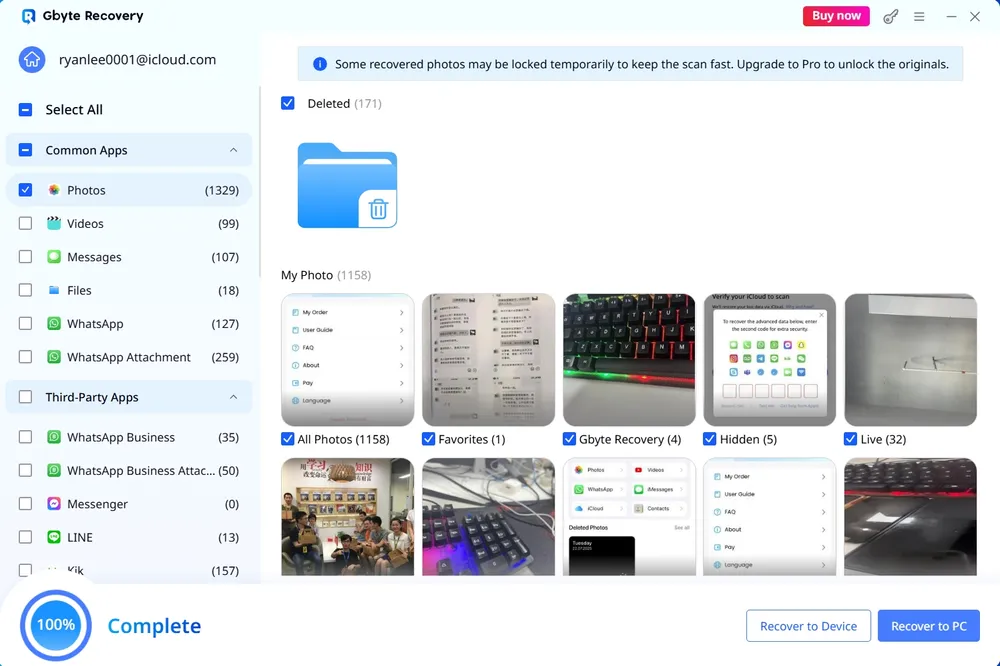
Gbyte Recovery — the only tool in our test that returned a deleted-items category with results
iMyFone D-Back — reads both iCloud backup and synced data, with a built-in backup feature
Dr.Fone — broad toolkit, but its iCloud mode reads synced data only
iMobie PhoneRescue — clean interface with useful export formats
Tenorshare UltData — the simplest interface of the five
We ran all five tools against the same iCloud account, under the same conditions, using each product's iCloud recovery mode.
Item | Detail |
iCloud account | Same account across all five tools |
Test device | iPhone 17, iOS 26 |
Computer | Windows 11 |
Recovery mode tested | iCloud recovery only |
Tested | September 4,2026 |
Several of these products also offer USB device scanning and iTunes backup extraction. Those paths were not part of this test, and results may differ.
For each tool: how many items the scan returned, which data categories produced results, whether deleted items appeared as a separate category, and what the free version allowed before payment.
Tool | Items found | Deleted items | Categories with results |
Gbyte Recovery | 1,329 photos, 99 videos, 107 messages, 127 WhatsApp | 171 | 11+ |
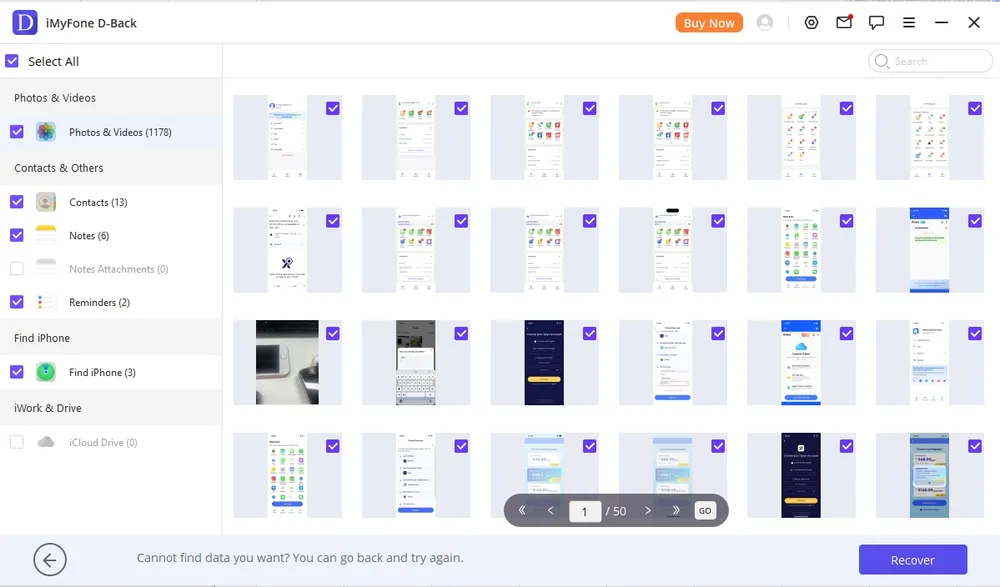
iMyFone D-Back | 1,178 photos & videos | No such category | 5 of 7 |
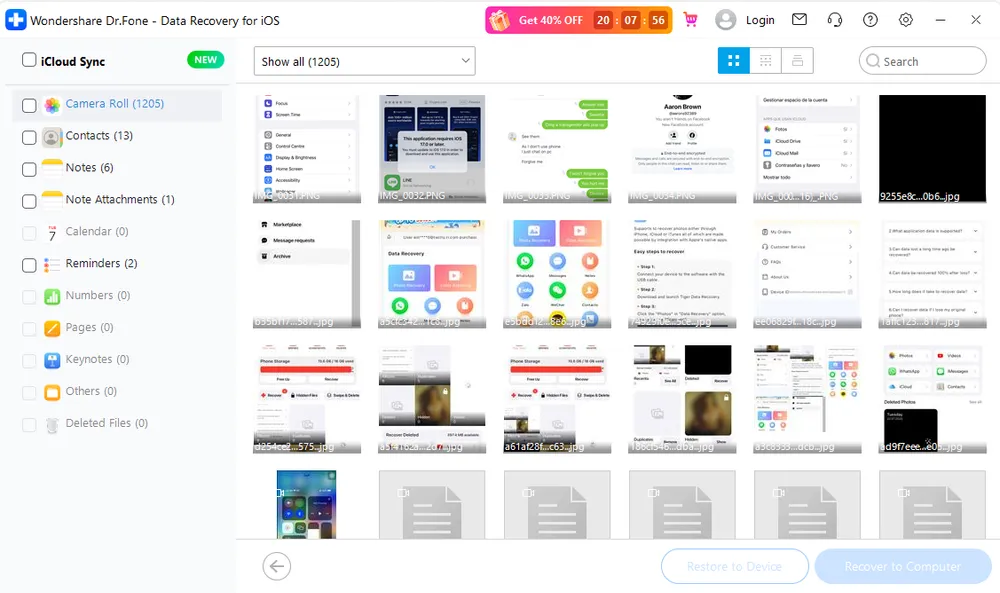
Dr.Fone | 1,205 items | 0 — shown in its own interface | 4 of 11 |
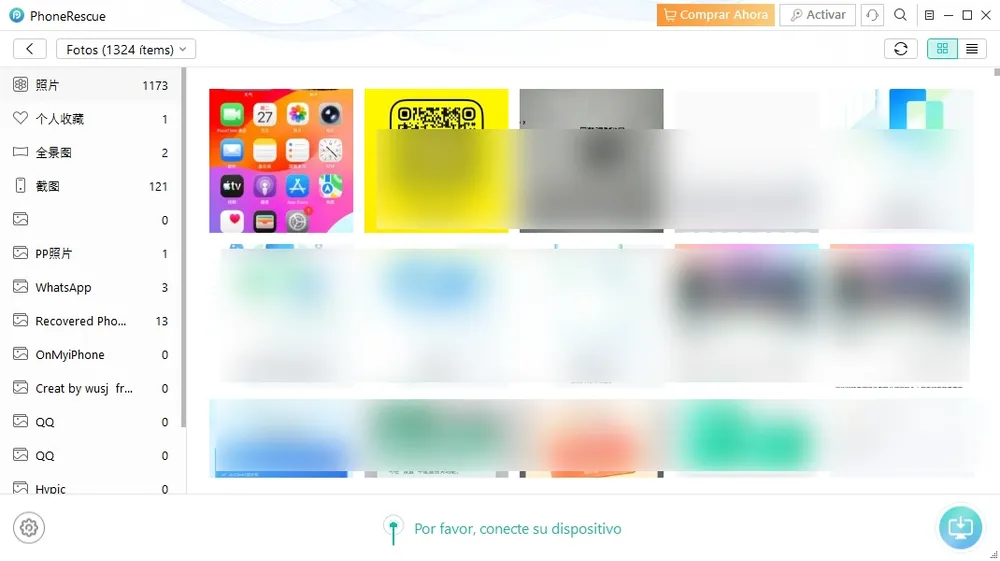
iMobie PhoneRescue | 1,324 photos | No such category | Photos, WhatsApp (3) |
Tenorshare UltData | 1,206 items (2.92 GB) | No such category | 6 of 10 |
Two things stand out.
The totals are close across all five — between 1,178 and 1,329 — which is expected, since they're reading the same account. What differs is what's inside those totals.
Three of the tools returned identical counts for Contacts (13), Notes (6) and Reminders (2). That's not a coincidence: they're reading the same synced iCloud data, the same information you can already see on iCloud.com.
Gbyte was the only tool in this test that returned a separate Deleted category, with 171 items in it.
What we got
The scan returned 1,329 photos, 99 videos, 107 messages, 18 files, 127 WhatsApp items with 259 attachments, 35 WhatsApp Business items with 50 attachments, 157 Kik items and 13 LINE items. Photos were further sorted into All Photos (1,158), Favorites, Hidden (5), Live (32) and a Deleted folder (171).
How it works
Gbyte reads your iCloud backup rather than the device itself. Because iCloud creates backups automatically in the background, there's often more stored there than people realise — including data you never manually saved.
Supported data
Apple apps: Photos, Videos, Messages, Notes, Calendar, Contacts, Safari, Reminders, Files Third-party apps: WhatsApp, WhatsApp Business, Kik, LINE, Messenger

Pros

Cons
D-Back supports both iCloud backup extraction and iCloud account data, which makes it more flexible than most tools in this list.
What we got
1,178 photos and videos, 13 contacts, 6 notes, 2 reminders and 3 Find iPhone entries. Notes Attachments and iCloud Drive both returned 0.
There is no deleted-items category. At the bottom of the results screen the software itself asks: "Cannot find data you want? You can go back and try again."
How it works
Two modes. iCloud Backup mode downloads and reads the backup file, then displays its contents. iCloud Account mode reads synced data — the same items visible on iCloud.com.
Supported data
Apple apps: Photos, Videos, Contacts, Notes, Reminders, Find iPhone Third-party apps: WhatsApp, LINE
Pros
Cons
Dr.Fone is the most recognisable name here and packs a lot of tools into one install. Its iCloud recovery mode, though, is narrow.
What we got
1,205 items in Camera Roll, 13 contacts, 6 notes, 1 note attachment and 2 reminders. Calendar, Numbers, Pages, Keynote and Others all returned 0.
Deleted Files returned 0 — and that figure comes from Dr.Fone's own interface, not our interpretation of the results.
The mode is labelled "iCloud Sync" in the software, which is an accurate description of what it does.
How it works
Dr.Fone's iCloud mode reads synced account data only — the same data already visible on iCloud.com. It doesn't parse backup files or reach deleted content.
Supported data
Apple apps: Photos, Contacts, Notes, Note Attachments, Reminders Third-party apps: None
Pros
Cons
PhoneRescue is light, quick and has the most flexible export options of the five.
What we got
1,324 photo items in total: 1,173 photos, 121 screenshots, 13 recovered photos, 2 panoramas, 1 favourite and 1 PP photo. WhatsApp returned 3 items. QQ, OnMyiPhone and several other categories returned 0.
No deleted-items category.
How it works
PhoneRescue reads synced iCloud account data — again, the same information available on iCloud.com, without access to older versions or deleted items.
Supported data
Apple apps: Photos, Messages, Notes, Calendar, Contacts, Safari Third-party apps: WhatsApp (3 items in our test)
Pros
Cons
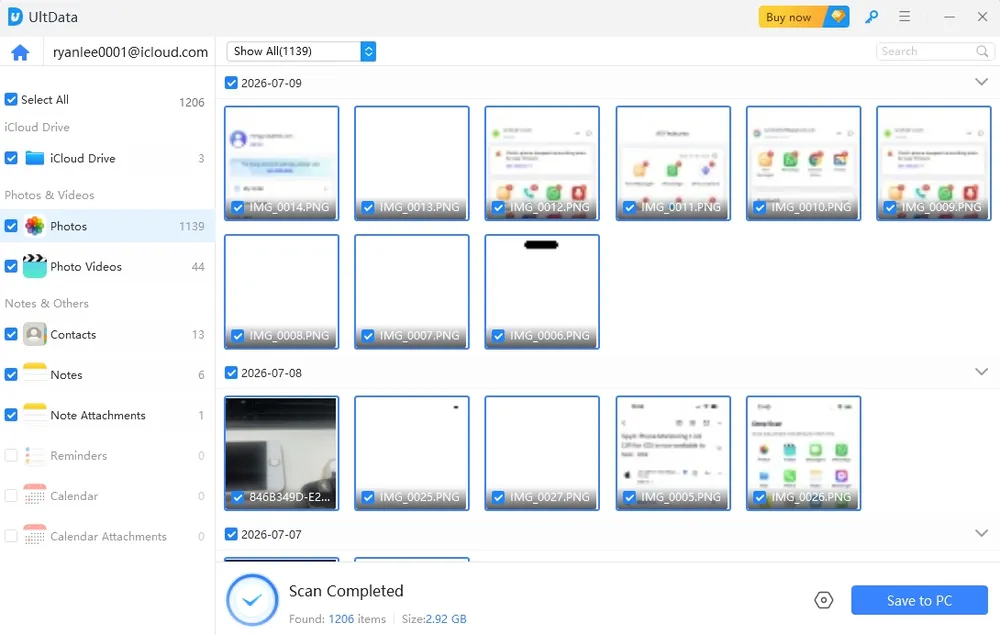
UltData has the cleanest interface here, which makes it a comfortable choice for anyone who hasn't used recovery software before.
What we got
1,206 items totalling 2.92 GB: 1,139 photos, 44 photo videos, 13 contacts, 6 notes, 1 note attachment and 3 iCloud Drive items. Reminders, Calendar and Calendar Attachments returned 0.
No deleted-items category. Results are grouped by date, which makes them easy to browse.
How it works
UltData reads synced iCloud account data. It doesn't scan backup files or return deleted items.
Supported data
Apple apps: Photos, Videos, Contacts, Notes, Note Attachments, iCloud Drive Third-party apps: None in iCloud mode
Pros
Cons
Tool | Monthly | Annual | Lifetime |
Gbyte Recovery | $49.99 | $99.99 ($8.33/mo) | $149.99 |
iMyFone D-Back | $49.99 | $69.99 ($5.83/mo) | $79.99 |
Dr.Fone | $79.95 | $99.99 ($8.33/mo) | $115.95 |
iMobie PhoneRescue | — | $49.99 | $69.99 |
Tenorshare UltData | $45.95 | $49.95 | $65.95 |
Prices checked September 7, 2026. Vendors change pricing and run promotions frequently — check the official site before buying.
Worth noting alongside the results above: the three tools that returned synced data only — Dr.Fone, PhoneRescue and UltData — sit in the same price range as the two that go further.
Across five tools reading the same iCloud account, the totals barely differ — 1,178 to 1,329 items. What differs is whether any of those items were actually deleted.
Four of the five returned only what's already visible on iCloud.com. Dr.Fone's interface said so directly, listing Deleted Files as 0. D-Back, PhoneRescue and UltData don't offer deleted items as a category at all.
Gbyte returned 171.
That's the practical split:
Gbyte Recovery — the only one that surfaced deleted content in this test
iMyFone D-Back — reads both backup and synced data, but needs two logins and returned no deleted items
Dr.Fone / PhoneRescue / UltData — read synced iCloud data only
If you want to view what's already in your iCloud account, any of these will do it, and iCloud.com will do it for free. If you're looking for something that's been deleted, that's a different job.
Because four of them are reading the same thing. Dr.Fone, PhoneRescue, UltData and D-Back's account mode all pull the synced data sitting in your iCloud account — the same content you can open at iCloud.com. That's why three of them returned identical counts for Contacts (13), Notes (6) and Reminders (2).
The headline number tells you how much is in your account. It doesn't tell you whether anything deleted came back.
It depends where the file was and whether a copy survived.
Items in Recently Deleted stay recoverable for 30 days, on both the device and iCloud.com. After that, whether anything can be retrieved comes down to whether the file was captured in an iCloud backup before it was deleted. If it was, extraction is possible. If it never reached iCloud at all, no software can bring it back — there's nothing to read.
These tools need your Apple ID and a two-factor code to read your iCloud data. There's no way around that — it's how Apple's authentication works.
What to check before you enter credentials: download only from the vendor's official site, read the privacy policy on what's stored and for how long, and be aware that any tool reading iCloud has to communicate with Apple's servers to do it. A scan that runs entirely offline can't reach your iCloud account in the first place.
Not with these tools. That's the main practical difference from Apple's own restore, which erases the device and rebuilds it from a backup — everything added since that backup goes with it.
Third-party extraction reads the data and saves it to your computer, leaving the phone alone. Some tools also offer to write files back to the device.
Check before you assume you don't have one. iCloud backups run automatically in the background when the phone is charging, locked and on Wi-Fi, so plenty of people have one without ever having tapped a backup button. Go to Settings → your name → iCloud → iCloud Backup to see the date of the last one.
If there genuinely isn't one and the file is past its 30-day window, no recovery tool will find it.
For viewing what's currently in your account, yes — and it's free. iCloud.com shows your photos, contacts, notes and Drive files, with a Recently Deleted section for items removed in the last 30 days.
Where it stops is older content. iCloud.com shows the current state of your account, not what was in a backup taken weeks ago. That gap is what these tools are for.

 Add Gbyte as a preferred source on Google
Share


Related articles


Copyright ©2026 Gbyte. All rights reserved. Gbyte’s software is not developed by or affiliated with Apple Inc.
The installation wizard will automatically start after downloading.
After registration, the recovery process can be managed through the web interface.
You get it all with your purchase - no locked features, no hidden limitations.