

Gbyte Repair

Gbyte Repair
Fix 150+ iOS issues yourself, no tech skills needed, no data loss
 Gbyte Editorial Team
Table of contents
Quick Verdict
Tenorshare ReiBoot is an easy-to-use iOS system repair tool with a guided repair workflow, Windows and Mac support, and additional features such as iOS upgrade and downgrade. In our test, both Standard Repair and Deep Repair successfully completed the repair process on the tested iPhone.
The free version includes one-click entry into Recovery Mode, while completing an actual iOS system repair requires a paid license. Tenorshare's official FAQ also states that users can exit Recovery Mode for free within five times. However, this did not work in our test: the Exit Recovery Mode feature required payment.
Overall Rating: ★★★☆☆ (3.8/5)
Recommended for:
Users who want a guided alternative to iTunes/Finder
Users who need iOS repair plus upgrade/downgrade tools
Users who need Windows/Mac support and broader Apple device compatibility
Not ideal for:
Users looking for a completely free iOS system repair solution
Users who need to repair more than five devices or use the software across multiple computers
Users looking for better long-term licensing value, as the annual and lifetime plans keep the same 5-device / 1-computer limit
Tenorshare ReiBoot is an iOS system repair software developed by Tenorshare. It focuses on solving software-related device problems without requiring users to manually use complex recovery methods. For iPhone users, ReiBoot mainly provides solutions for issues such as iPhone stuck on Apple logo, iPhone stuck in Recovery Mode, iOS update failures, and other system-related errors.
Compared with Apple's built-in tools such as iTunes or Finder, ReiBoot aims to simplify the repair process through a more guided interface.
Before testing, I looked into what Tenorshare officially claims ReiBoot can do. Positioning itself as a No.1 free iOS repair tool, here's what it claims based on the official product page:
Feature | Official claim |
iOS System Repair | Fixes 150+ iOS system issues, such as Apple logo stuck, black screen, and boot problems, without data loss |
Recovery Mode | Free one-click entry; official FAQ states up to five free exits |
iOS Upgrade/Downgrade | Supports iOS version upgrades and downgrades without jailbreak or iTunes |
Data Eraser | Permanently removes device data before resale or transfer |
Factory Reset | Resets iOS devices without requiring a passcode or iTunes |
Tester background: To evaluate ReiBoot's user experience and repair effectiveness, I tested its two mode workflows: Standard Repair mode and Deep Repair mode, since this is the feature Tenorshare markets most heavily and the one most users search for.
Test scenario: iPhone stuck on Apple logo — one of the main repair scenarios ReiBoot advertises and a common iOS issue.
Evaluation criteria: I evaluated ReiBoot based on several key factors: repair capabilities, ease of use, data safety, feature availability, pricing transparency, and overall user experience.
Test detail | Value |
Device | iPhone XR |
iOS version | 18.7.9 |
Computer | Windows 10 |
ReiBoot version | 9.6.13 |
Fault (Test scenario ) | iPhone stuck on Apple logo |
Repair mode used | Standard Repair, Deep Repair |
Success criteria | The iPhone could boot normally after repair; for Standard Repair, existing data remained accessible. |
Test date | 2026.07.28 |
Before using any third-party iOS repair tool, users usually have concerns about software download safety, privacy protection, jailbreak risks, and potential data loss. To address these, I went through each of these areas myself during testing — here's what I found:
Security Aspect | Evaluation |
Official download source | Downloaded from Tenorshare's official website |
Software legitimacy | Tenorshare provides an official website, product documentation, and customer support resources |
Safe to download | After downloading and installing the software, I encountered no intrusive ads during testing, and my antivirus program found no malware or security issues with the application. |
Privacy protection | Tenorshare provides a Privacy Policy explaining how user information is collected and processed |
Jailbreak requirement | No jailbreak required |
Data loss risk | Depends on the repair mode selected |
Feature transparency | Some features are free, while advanced functions require a paid license |
To evaluate how ReiBoot handles common iOS startup issues, I tested its ability to repair an iPhone stuck on the Apple logo and unable to boot normally. Before reviewing the testing results, it is important to understand how ReiBoot works and what happens behind the repair process.
ReiBoot primarily works by repairing iOS system issues through firmware-based recovery. After detecting the connected iPhone, it identifies the appropriate iOS firmware package and uses it to reinstall or restore damaged system components.
The software provides several repair options depending on the severity of the issue. For minor system problems, features such as entering or exiting Recovery Mode may help the device return to a normal state. If the issue persists, Standard Repair performs a deeper iOS reinstallation while attempting to preserve user data. A more advanced repair option is also available for situations where standard methods fail, although it may involve different data considerations.
During the repair process, the firmware download is typically the most time-consuming step, as the duration mainly depends on the firmware size and network speed.
Steps followed:
Connect the test device to the computer and launch ReiBoot.
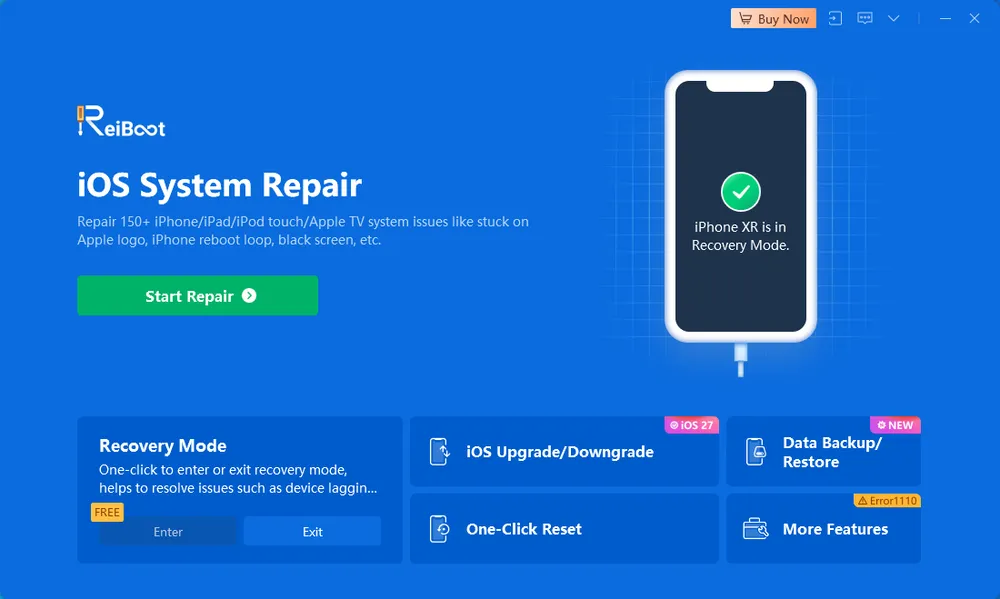
Click "Start Repair" after ReiBoot recognizes the connected iPhone.
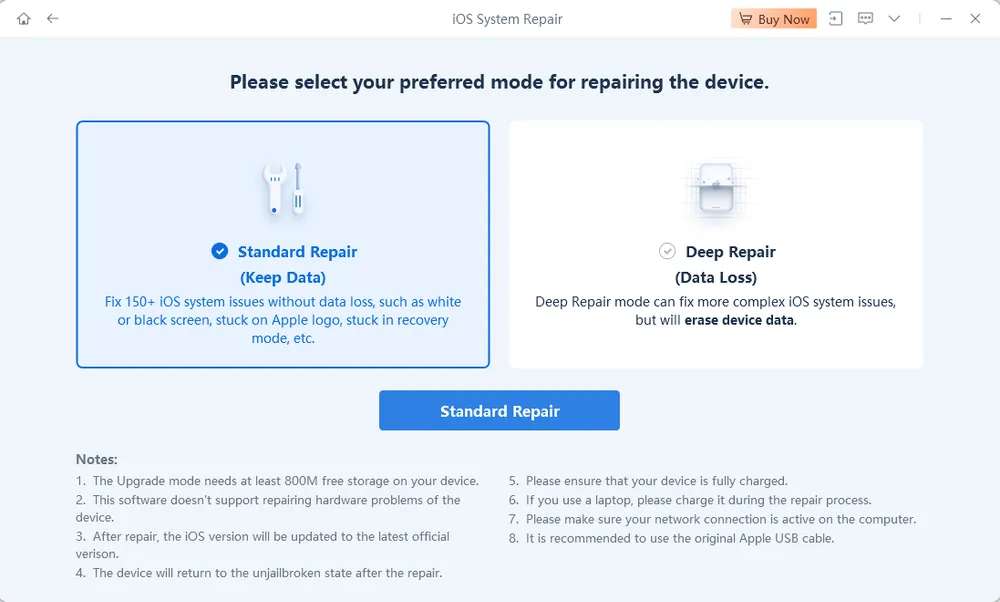
Select Standard Repair or Deep Repair mode.
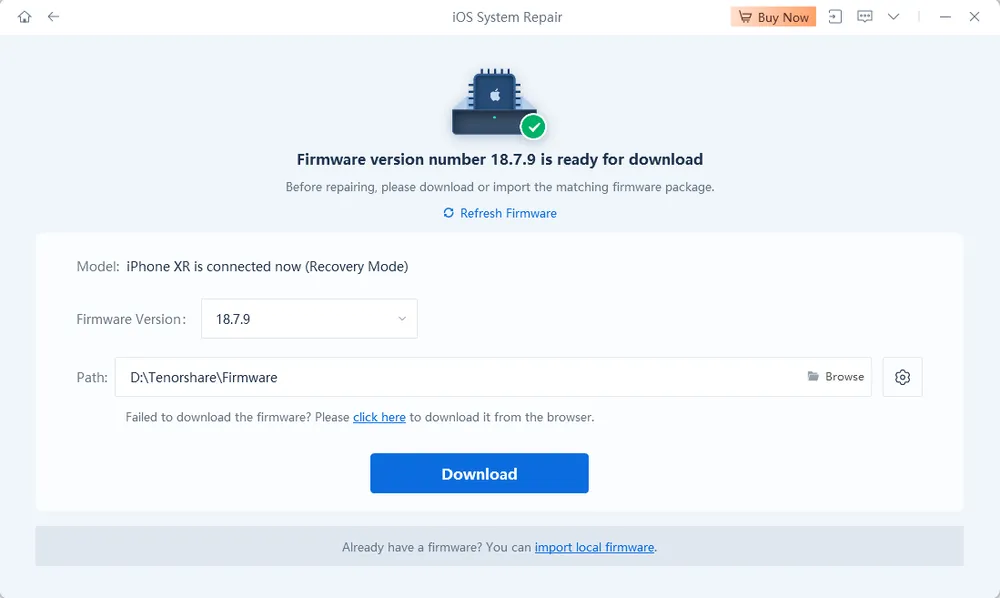
Download the matching iOS firmware package.
Click "Start Standard Repair" or "Start Deep Repair" once the firmware package is ready.
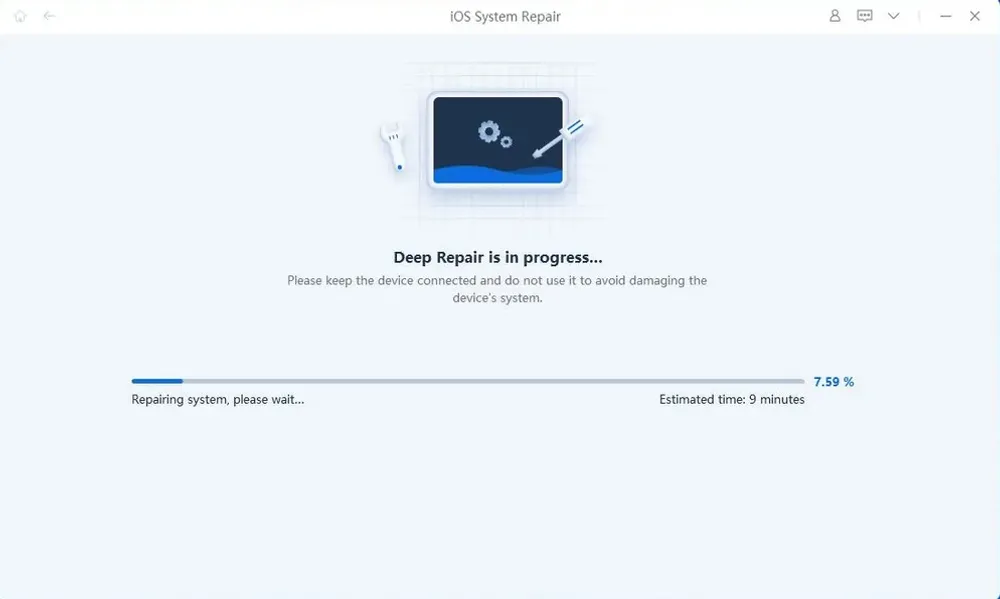
Allow ReiBoot to complete the repair process automatically.
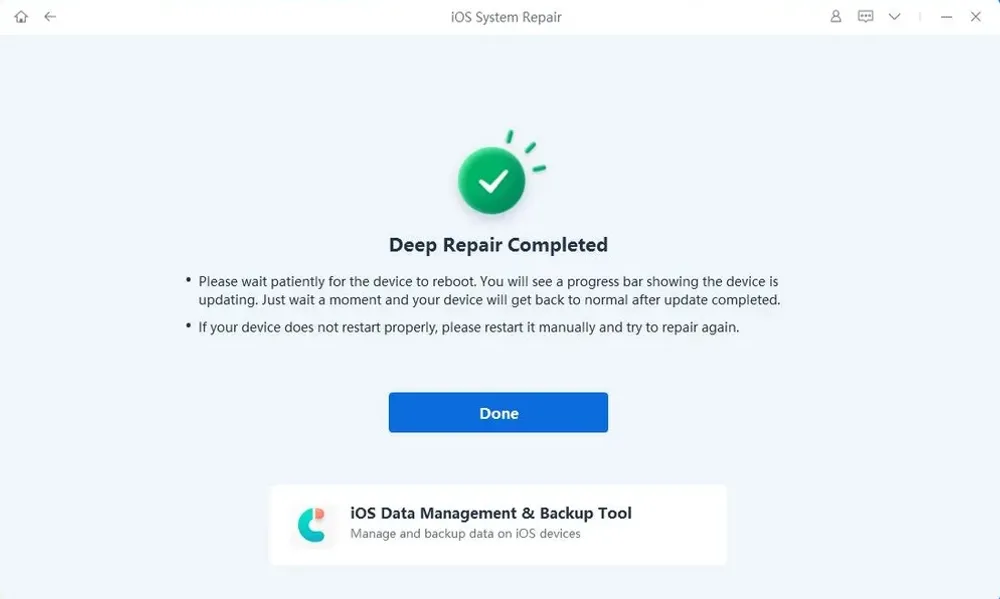
Overall, the repair workflow was straightforward and easy for me to follow. ReiBoot guided the entire process from device detection and repair mode selection to firmware download and repair execution, without requiring complicated manual steps.
During testing, ReiBoot successfully detected the iPhone, downloaded the required firmware package, and completed both Standard Repair and Deep Repair processes. The device automatically rebooted after the repair process finished, and the overall workflow was smooth.
I also encountered an issue while evaluating ReiBoot's Recovery Mode workflow. After entering and attempting to exit Recovery Mode (without starting a repair process), the device became stuck in Recovery Mode and could not exit normally.
I first tried common troubleshooting steps, including disconnecting the USB cable and performing a force restart, but the device remained in Recovery Mode. I then switched to the paid version of ReiBoot and used the "Exit Recovery Mode" feature, which successfully brought the iPhone out of Recovery Mode.
In my test, the one-click Exit Recovery Mode feature was only available after upgrading to the paid version. Users who encounter a similar situation during the free workflow may therefore need to try other troubleshooting methods or upgrade to access the exit feature.
Metric | Standard Mode | Deep Mode |
Outcome | ✅ Success | ✅ Success |
Data loss | ❌ | ✅ |
Time required | 16 min | 20 min |
Testing Limitations:
This evaluation is based on a single test run using one iPhone device, so it can confirm whether ReiBoot successfully completed the repair in this specific scenario and whether data was preserved or erased. It doesn't represent all device and iOS version combinations, since only one device configuration was evaluated.

Pros

Cons
ReiBoot can be downloaded for free, but most of its core iOS repair features require a paid license. There is also a difference between what Tenorshare currently states on its official FAQ and what we encountered during testing.
Enter Recovery Mode
Tenorshare's official FAQ states that the free version can also exit Recovery Mode up to five times:
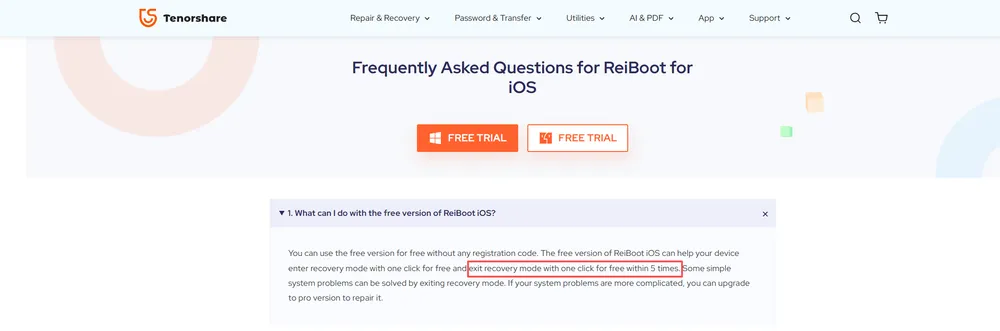
However, this did not match our test experience. When I tried to use Exit Recovery Mode with the free version of ReiBoot 9.6.13 on Windows 10, the device did not exit Recovery Mode. Instead, ReiBoot displayed an upgrade prompt stating that I was using the free version. In the same prompt, "1-Click to Exit Recovery Mode" was marked as available only in the Full Version.
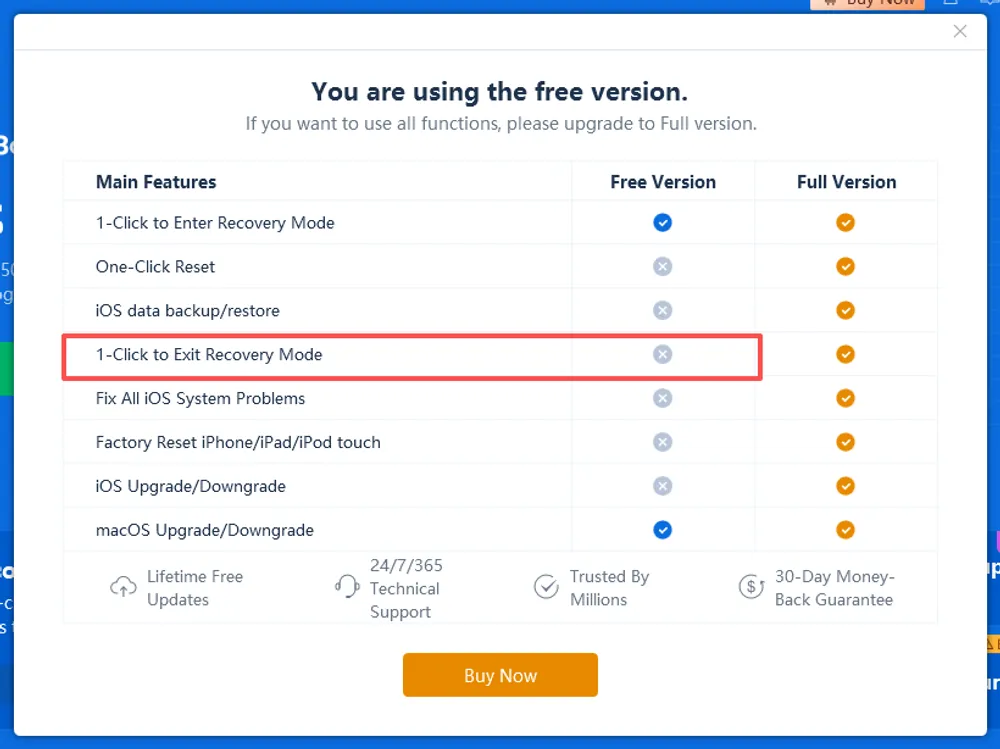
In the version we tested, ReiBoot showed the following iOS features as requiring the Full Version:
Exit Recovery Mode
Standard Repair / Deep Repair
iOS Upgrade/Downgrade
Reset the device
ReiBoot offers monthly, annual, and lifetime licenses for both Windows and Mac. Pricing differs by platform, while each individual license covers up to 5 devices on 1 computer.
Plan | Windows | Mac | License |
1 Month | $24.95 | $39.95 | 5 devices / 1 computer |
1 Year | $51.95 | $59.95 | 5 devices / 1 computer |
Lifetime | $89.95 | $92.95 | 5 devices / 1 computer |
Pricing updated: September 1, 2026. Prices may vary by platform, region, or promotion.
The monthly and annual plans are subscription-based and renew automatically unless canceled. The lifetime plan is a one-time purchase for the licensed computer. Windows and Mac licenses are sold separately.
For individual users, the main difference between the three plans is license duration rather than repair capability. ReiBoot also offers business plans for users who need coverage for more devices or computers.
⚠️ If your phone is simply stuck in Recovery Mode and won't come out on its own, the free version can't do it for you — and paying just for this one function isn't great value.
ReiBoot comes with a 30-day money-back guarantee, but the refund policy is subject to specific conditions rather than being a no-questions-asked refund. Before purchasing, users should understand what situations may qualify for a refund and how subscription terms can affect eligibility.
You're covered if:
You were double-charged for the same product within 48 hours
You bought the wrong product (you'll need to purchase the correct one first, then get the original refunded)
You never received your registration code within 24 hours and support didn't respond in time
You cancelled your subscription before the renewal date but got charged anyway — with proof (a cancellation confirmation email)
You're generally not covered if:
You simply changed your mind
You didn't read the product page carefully before buying and it doesn't do what you assumed
You missed the renewal date — once you're charged, that charge is final, even if you cancel the day after
Support tried to troubleshoot the issue and you declined to cooperate (screenshots, logs, remote sessions)
For subscription plans, users should pay close attention to renewal terms. Cancelling after a renewal charge has already been processed may not guarantee a refund, so checking the subscription status before the renewal date is recommended.
Beyond the official refund policy, third-party reviews show mixed experiences with ReiBoot's purchasing and after-sales process. Some users report positive interactions with customer support and successful resolutions, while others mention concerns related to refund requests, subscription renewals, or unexpected charges.
For example, one ReiBoot customer on Trustpilot reported that they believed the site advertised a 7-day free trial but were charged approximately $30 immediately. According to the reviewer, support explained that the guarantee "doesn't mean a full refund for every order." This reflects an individual customer experience and should not be considered representative of all ReiBoot users.
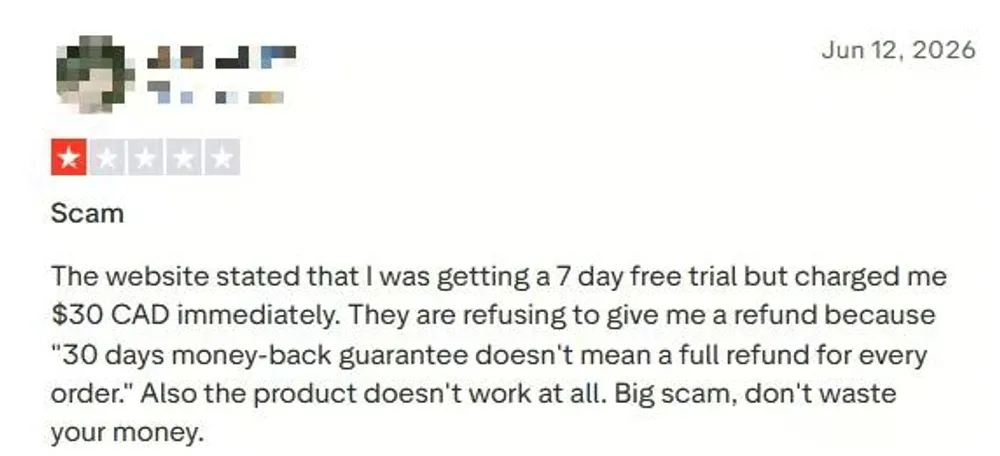
Overall, available user feedback appears to be more divided around billing, subscription terms, and refund experiences than around the general usability of ReiBoot itself. Potential buyers should review the subscription details and refund conditions carefully while also considering whether ReiBoot’s repair features match their specific needs.
Official claim | Verdict |
No jailbreak required | ✅ Confirmed — no jailbreak was needed at any point during testing |
Standard Repair can fix iOS system issues without data loss | ✅ Confirmed in our test — Standard Repair completed successfully on an iPhone stuck on the Apple logo, with user data preserved |
Deep Repair can fix iOS system issues but erases data | ✅ Confirmed in our test — Deep Repair completed successfully, but user data was erased during the process |
Recovery Mode enter & exit | ⚠️ Mixed result — Free Recovery Mode entry worked as described. Tenorshare's FAQ states that up to five free exits are available, but Exit Recovery Mode triggered an upgrade prompt in our test. |
Supports iOS system repair without iTunes/Finder | ✅ Confirmed in our test — repair was completed using ReiBoot without requiring iTunes/Finder |
30-day money-back guarantee | ⚠️ Policy-based — the refund policy exists, but actual refund experience was not tested |
Overall, ReiBoot delivered on most of the core repair claims we tested. Standard Repair and Deep Repair both completed successfully in our test, with the main difference being data preservation. The main inconsistency we encountered was with Recovery Mode exit: Tenorshare states that users can exit Recovery Mode for free within five times, while in our test, the Exit Recovery Mode feature required payment. Refund-related claims were reviewed based on policy information rather than hands-on testing.
ReiBoot performed well on the technical fundamentals I could directly verify: no jailbreak required, no iTunes/Finder dependency, and both repair modes completed successfully in my test. The guided workflow also makes it accessible for users who aren't comfortable with Apple's more manual troubleshooting steps.
Overall, ReiBoot is a capable and well-rounded iOS system repair tool. Its Windows and Mac support and additional features such as iOS upgrade/downgrade add versatility. One point to be aware of is Recovery Mode exit: although Tenorshare states that the free version includes a limited number of free exits, our test and the in-app feature comparison both indicated that this feature required payment.
Category | Rating | Notes |
Ease of Use | ★★★★★ | Clear, guided workflow with minimal manual steps |
Repair Capability | ★★★★☆ | Standard and Deep Repair both completed successfully in our test, but other issue types were not tested |
Data Safety | ★★★★☆ | Standard Repair preserved data; Deep Repair erased it, as expected |
Free Version Value | ★★☆☆☆ | Free Recovery Mode entry is available, but full system repair requires payment; Recovery Mode exit also required payment in our test |
Pricing Value | ★★★☆☆ | Monthly pricing is acceptable, but annual and lifetime plans keep the same 5-device / 1-computer limit |
Refund & Customer Support | ★★★☆☆ | 30-day money-back guarantee with eligibility conditions; third-party reviews show mixed outcomes on refunds and support responsiveness |
Overall Rating | ★★★☆☆ (3.8) | A capable, well-rounded repair tool with some limitations in free features and long-term licensing value |
Users who want a simple, guided solution for common iOS system issues
Users looking for an alternative to iTunes/Finder-based repair methods
Users who want iOS upgrade and downgrade tools alongside system repair
Users who need both Windows and Mac support and broader Apple device coverage, including iPhone, iPad, iPod touch, and Apple TV
Users who primarily need a free Recovery Mode exit
Users who need to repair more than five devices or use the software across multiple computers
Users looking for a completely free iOS system repair solution
Users looking for better long-term licensing value, as the annual and lifetime plans keep the same 5-device / 1-computer limit
If you want more flexibility over repair depth and data handling — or you're simply comparing options before you spend money — we ran a hands-on comparison between Gbyte Repair and ReiBoot: pricing, free Recovery Mode, and repair features, side by side.
👉 Read our full ReiBoot vs. Gbyte comparison
ReiBoot is free for entering Recovery Mode, but full iOS system repair requires a paid license. It states that Recovery Mode can also be exited for free within five times, although this required payment in our test.
ReiBoot's Standard Repair fixes most common iOS issues — like being stuck on the Apple logo or a frozen screen — without erasing your data. Deep Repair handles tougher issues Standard Repair can't fix, but it erases all data on your device. In my testing, both modes worked on the Apple logo issue — I'd recommend trying Standard Repair first since it's non-destructive.
ReiBoot supports most Apple devices, including iPhone, iPad, iPod touch, and Apple TV models. Supported iPhones range from iPhone 5 to the latest iPhone 17 series, while iPad and iPod touch devices are also covered. For Mac users, ReiBoot supports iOS-related features on Mac computers, with system repair available for selected Mac models.
No. ReiBoot is designed to repair software-related system issues on iOS devices, such as being stuck on the Apple logo, boot loops, or failed updates. It cannot fix physical hardware problems, including a damaged screen, faulty battery, or defective internal components. If your issue is caused by hardware failure, professional repair may be required.
 Add Gbyte as a preferred source on Google
Share


Related articles


Copyright ©2026 Gbyte. All rights reserved. Gbyte’s software is not developed by or affiliated with Apple Inc.
The installation wizard will automatically start after downloading.
After registration, the recovery process can be managed through the web interface.
You get it all with your purchase - no locked features, no hidden limitations.