

Gbyte Repair

Gbyte Repair
Fix 150+ iOS issues yourself, no tech skills needed, no data loss
Table of contents
It's 2 AM. You're trying to update your iPhone to the latest iOS. The progress bar hits 75%… then freezes. iTunes pops up: "The iPhone could not be restored. An unknown error occurred (4013)."
Your heart sinks. Photos, messages, work files—all feel at risk. You've tried replugging the cable, restarting, even switching computers. Nothing works. You're not alone: iPhone Error 4013 is one of the most frustrating iOS restore failures, often triggered by a tiny connection glitch or hidden hardware conflict.
But here's the good news: 90% of error 4013 cases can be fixed without data loss — if you follow the right troubleshooting steps in the correct order.
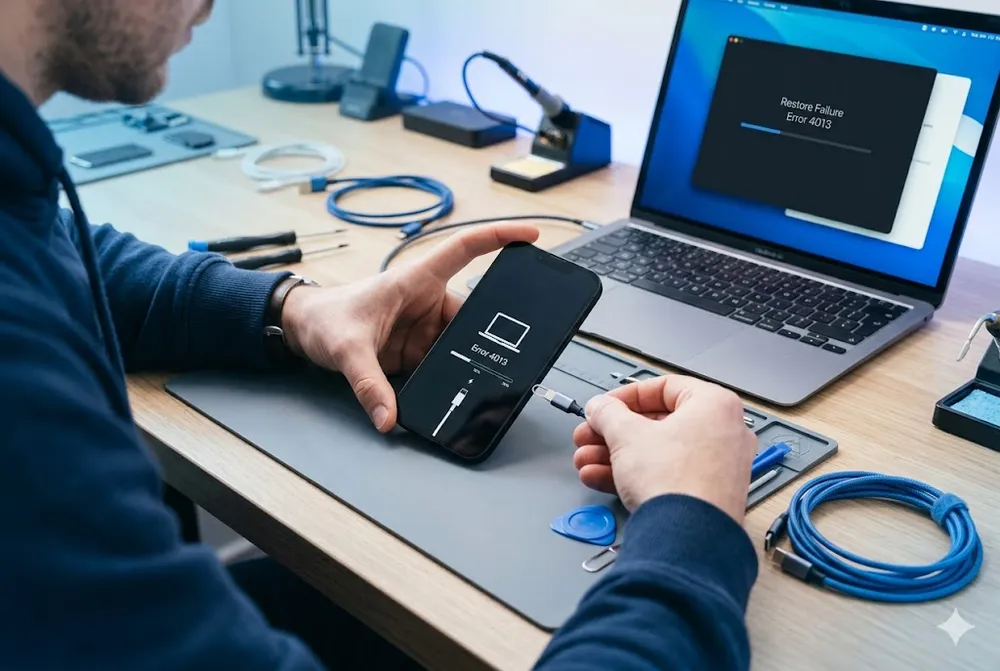
iPhone Error 4013 is a common update or restore error that usually occurs due to a communication issue between your iPhone and computer, typically caused by a faulty USB connection, outdated iTunes, or a corrupted firmware file. To fix it, try checking your USB connection, performing a force restart, or updating iTunes and your computer's OS. If these steps don't work, Gbyte iOS System Repair offers a data-safe, beginner-friendly alternative that auto-detects your device and repairs common software-related causes of error 4013. In most cases, this issue can be resolved without data loss.
Note: Error 4013 itself does not erase your data. However, repeatedly restoring your iPhone without fixing the underlying issue—or performing a full restore through iTunes/Finder or DFU Mode—may erase existing data.
iPhone Error 4013 can be triggered by a variety of hardware and software issues. Common causes include:
Faulty USB connections (damaged or non-certified cables, unstable ports)
Outdated iTunes, macOS, or Windows software
Interrupted download or incomplete firmware file
Temporary software glitches
Hardware problems (less common), such as a faulty proximity sensor or logic board issue
💡 Pro Tip: Always choose "Update" instead of "Restore" in iTunes when prompted. "Update" reinstalls iOS while preserving your personal data; "Restore" erases everything.
Your Situation | Recommended Fix | Time Needed | Difficulty | Data Risk |
Just saw error 4013 during update | Force restart iPhone | 5 min | Easy | None |
iTunes or your computer's OS hasn't been updated recently | Update iTunes and Your Computer OS | 10 min | Easy | None |
Using an old or third-party cable | Swap to original Apple USB cable | 2 min | Easy | None |
Comfortable with manual button timing | Enter Recovery Mode > Choose "Update" (not “Restore”) | 15-30 min | Hard | None |
Want a fast, beginner-friendly fix without touching iTunes | Standard Repair Mode | ~10 min after firmware download | Easy | None |
Error persists on this computer | Try a Different Computer | 15-20 min | Medium | None |
Suspect hardware damage (drop, water, aging cable) | Backup data → Contact Apple Support | Varies | Hard | High if restoring |
A force restart clears temporary system glitches that may block iOS communication with iTunes.
iPhone 8 or later: Press Volume Up → Volume Down → Hold Side button until Apple logo appears.
iPhone 7/7 Plus: Hold Side + Volume Down buttons together until logo appears.
iPhone 6s or earlier: Hold Home + Top/Side buttons until logo appears.
After restart, reconnect to computer and retry the update.
Outdated iTunes or operating system files can cause handshake failures during restore.
On Mac: Open App Store → Updates → Install macOS updates. iTunes is built-in on macOS Catalina+.
On Windows: Open Microsoft Store → Search "iTunes" → Update. Also check Windows Update.
Restart your computer after updating, then reconnect your iPhone.
Non-certified cables or USB hubs often cause intermittent disconnections triggering error 4013.
Replace third-party cables with an Apple-certified Lightning/USB-C cable.
Plug directly into a computer USB port (avoid hubs, docks, or keyboard ports).
Try a different USB port if the first fails.
If you see your iPhone could not be restored with error 4013, you can enter Recovery Mode to resolve it. Recovery Mode forces iTunes to re-establish communication with a frozen iPhone. Not sure whether you need Recovery Mode or DFU Mode? They're not the same thing — see our guide on Recovery Mode vs DFU Mode to understand the difference.
⚠️ Manual entry requires precise button timing—easy to miss and repeat the error.
Connect iPhone to computer.
Follow force restart steps above, but keep holding the button(s) until you see the recovery mode screen (cable + iTunes icon).
In iTunes/Finder, choose "Update" (not "Restore").
If manual methods feel risky or repetitive, Gbyte iOS System Repair offers a beginner-friendly alternative. It eliminates manual button timing by auto-entering Recovery Mode with one click, and guides you into DFU Mode with clear step-by-step instructions, automatically detecting once your device has entered DFU Mode.
✅ Auto device recognition: Detects your iPhone model and iOS version instantly
✅ Free one-click recovery mode: No more guessing button sequences or timing windows
✅ Standard repair mode: Fixes 150+ iOS system issues, including error 4013, without deleting photos, messages, or apps
✅ Clear visual guides: Step-by-step instructions with screenshots; zero technical knowledge needed
✅ Broad compatibility: Works with all iPhone models and iOS versions, including iPhone 17 and iOS 26
How it works:
Download Gbyte → Connect iPhone → Select "Standard Repair" → Click "Start". The tool handles communication repair in the background while preserving your data.
USB controller conflicts or driver issues on one PC/Mac can block restore processes.
Borrow a friend's computer or use a work machine.
Install the latest version of iTunes (Windows) or ensure macOS is up to date.
Retry the update with your iPhone connected directly.
If all software fixes fail, error 4013 may indicate a hardware fault, like a damaged proximity sensor or logic board issue.
Visit Apple Support or schedule a Genius Bar appointment.
Mention you've tried cable swaps, updates, and recovery mode—this speeds up diagnosis.
If under warranty or AppleCare+, hardware repairs may be covered.
A: Error 4013 is a communication failure between your iPhone and computer during an iOS update or restore, usually caused by a USB connection issue, outdated iTunes, or a corrupted firmware file. It doesn't mean your data is lost — it simply means the process was interrupted before it could finish.
A: Yes—if you use "Update" instead of "Restore" in iTunes, or choose Gbyte's Standard Repair Mode, your personal data remains intact. Only "Restore" or hardware-level repairs risk data loss.
A: Error 4013 specifically interrupts the high-bandwidth communication needed for iOS firmware installation. Minor connection drops that don't affect daily use can halt the restore process.
A: Not necessarily. Most cases stem from software or connection issues. However, if the error persists after trying all fixes, a hardware diagnostic at Apple is recommended.
A: Reputable tools like Gbyte iOS System Repair that offer "Standard Repair" mode can fix system errors without data loss. Always verify the tool supports your iOS version and has clear privacy policies.
A: Use Apple-certified cables, keep iTunes/macOS updated, avoid interrupting iOS updates, and back up regularly via iCloud or Finder.
 Add Gbyte as a preferred source on Google
Share


Related articles


Copyright ©2026 Gbyte. All rights reserved. Gbyte’s software is not developed by or affiliated with Apple Inc.
The installation wizard will automatically start after downloading.
After registration, the recovery process can be managed through the web interface.
You get it all with your purchase - no locked features, no hidden limitations.